https://servicedesk.telkomuniversity.ac.id/faq/cara-reset-password-login-windows-10-11-tanpa-kehilangan-data/

- Advance Option
-

Untuk mengubah penulisan Rupiah dari excel mail merge ke word
{ MERGEFIELD Jumlah \# "#.##0" }
{ MERGEFIELD Jumlah \# "#.##0,00" }
Mengubah penulisan tanggal
{ MERGEFIELD date \@ "dd MMMM yyyy" }
site:drive.google.com /preview *intext:tv series* inurl:flv | wmv |mp4 -pdf -edit -view
site:drive.google.com /preview *intext:tutorial* inurl:flv | wmv | mp4 -pdf -edit -viewsite:drive.google.com /preview *intext:720p *inurl:flv | wmv | mp4 -pdf -edit -viewfiletype:pdfWhen try to start login the windows server, and we should to press Ctrl+Alt+Del then it suddenly open your local task manager,
The solution, by adding shift
Enable Screen Brightness Control with Registry Tweak
You can enable screen brightness control in Windows by using the KMD_EnableBrightnessInterface2 registry parameter under the reg key HKEY_LOCAL_MACHINE\SYSTEM\ControlSet001\Control\Class\{4d36e968-e325-11ce-bfc1-08002be10318}\0000.
Open the Registry Editor (regedit.exe), go to the registry key above, find the DWORD parameter KMD_EnableBrightnessInterface2 and change its value from 1 to 0
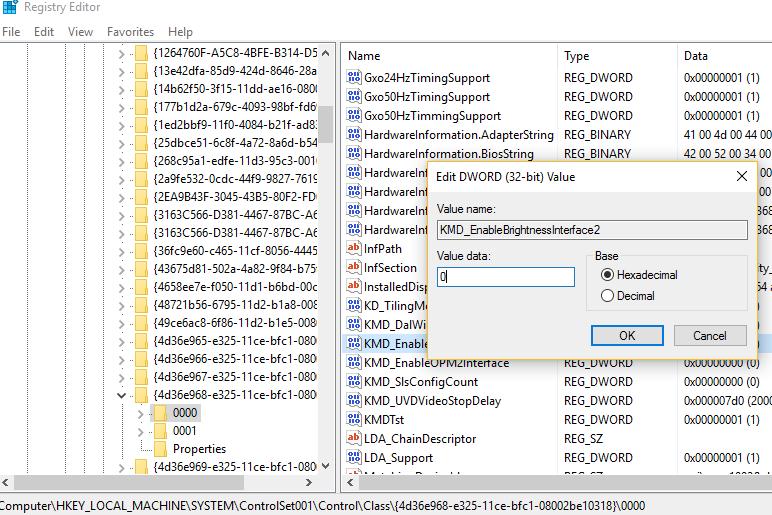
There can be several KMD_EnableBrightnessInterface2 parameters in the registry. So use the search (F3) and find all the other parameters named KMD_EnableBrightnessInterface. For all found parameters, you need to change the value from 1 to 0.
Reboot your laptop.
Error: Can't connect to local MySQL server through socket '[path to mysqld.sock]'
sudo apt purge --auto-remove mysql*
sudo rm -r /etc/mysql
sudo rm -r /var/lib/mysql*

sudo apt install mysql-client-8.0 mysql-server-8.0 --fix-broken -y
unit mysql.service is masked
unable to login phpmyadmin
- sudo nano /etc/apache2/conf-available/phpmyadmin.conf-<Directory /usr/share/phpmyadmin> Options SymLinksIfOwnerMatch DirectoryIndex index.php AllowOverride All
mysqli::real_connect(): (HY000/1045): Access denied for user 'phpmyadmin'@'localhost' (using password: YES)
Connection for controluser as defined in your configuration failed.
change
-$dbuser='root';
-dbpass='curentpassword'
systemctl restart mysql.service

List all not installed optional components:
$(foreach ($feature in Get-WmiObject -Class Win32_OptionalFeature -Namespace root\CIMV2 -Filter "InstallState != 1") {$feature.Name}) | sort
--------------------------
dism /Online /Get-Features /Format:Table\-------------------------
As default in WinSCP, the hidden folder/file is hidden and need to change the setting on Option-Panels- Show hidden File or (Ctrl+Alt+H)

HKEY_CURRENT_USER\Software\Microsoft\Windows\CurrentVersion\Explorer\Advanced\TaskbarSi

- Open google and write Microsoft OTD or Link
- install Microsoft OTD
- open PowerShell x86
- placed to download directory (cd file directory)
- write ( .\setup.exe /download .\configuration-Office365-x64.xml)
- waiting until finish (after able to write new script)
- write ( .\setup.exe /configure .\configuration-Office365-x64.xml)
Command Prompt is have much function and can run/execution several program from this CMD
- How to clear CMD panel screen:
> cls
> enter
- How resize font CMD
> right click in top panel


Unpack the contents of the archive to the folder: C:\Users\[[**UserName**]]\AppData\Roaming\Baidu\BaiduNetDisk
Repack edition is the ability to select the language installed for the program, the possibility of a quiet installation. Nothing needs to be copied and replaced everything in the installer.

The version portable does not require installation. Does not leave the tracks system. Unpack and use the language change (after the first launch), in the ChooseLang.ini file current = Register the desired language:
Download file link in below
1. Open the registry (Run -> regedit)
2. Navigate to "HKEY_CURRENT_USER>SOFTWARE>Solidworks>SOLIDWORKS 2015>Performance>Graphics>Hardware>Current"Remove image shadow background
- Open CSS and add this Code
.post-body img, .post-body .tr-caption-container, .ss, .Profile img, .Image img,
.BlogList .item-thumbnail img {
padding: none !important;
border: none !important;
background: none !important;
-moz-box-shadow: 0px 0px 0px transparent !important;
-webkit-box-shadow: 0px 0px 0px transparent !important;
box-shadow: 0px 0px 0px transparent !important;
}
Make image Header in Center
.header-inner .Header #header-inner { display: block; margin: 0 auto; width: 750px; }

As we know for downloading a book or article in Scribd, Academia, etc.
- https://docdownloader.com/
- https://downscribd.com/
- https://z-lib.org/
- https://archive.org/

